📊 Understanding Feature Scaling in Machine Learning with Scikit-Learn
When building machine learning models, it's easy to overlook one small—but critical—step: feature scaling. Without it, your model might make poor predictions, learn too slowly, or even fail to converge. In this post, we'll explore what scaling is, why it matters, and how to apply it using Python and Scikit-learn.
🔍 What Is Feature Scaling?
Feature scaling is the process of transforming numerical input features so that they all fall within a similar range.
For example, imagine two features:
Age: ranges from 18 to 80Income: ranges from 20,000 to 200,000
If we don’t scale them, machine learning models (especially those that use distance or gradient descent) may give too much importance to the larger numbers — not because they're more important, but because they have bigger scales.
⚠️ Why Is Scaling Important?
| Reason | Explanation |
| 📐 Prevents Bias Toward Larger Features | Features like income can dominate age or count features |
| 🚀 Improves Model Convergence | Algorithms like Logistic Regression or SVM converge faster |
| 🤖 Required by Some Models | KNN, SVM, Neural Networks need features on similar scale |
| 🧪 Ensures Consistent Results | Especially important in pipelines or real-time systems |
🔧 Popular Scaling Techniques in Scikit-Learn
1. StandardScaler
Subtracts the mean and divides by the standard deviation.
Final result has:
Mean = 0
Standard Deviation = 1
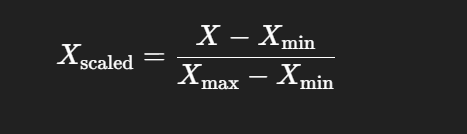
2. MinMaxScaler
Scales values between 0 and 1 using:
3. RobustScaler
Uses median and interquartile range (IQR)
Good for data with outliers
📊 StandardScaler vs Outliers: Why Scaling Isn't Always Enough
When building machine learning models, one of the most common preprocessing steps is feature scaling. And the most popular scaler? The StandardScaler from Scikit-learn. But what happens when your data contains outliers?
In this blog post, we'll walk through:
What
StandardScalerdoes (with code and output)How outliers break it
How to fix it using
RobustScalerWhen you should remove outliers instead
✅ Step 1: Normal Use of StandardScaler
Let's say we're building a customer churn model with features like Age and Monthly Charges.
from sklearn.preprocessing import StandardScaler
import pandas as pd

# Simulated customer data
data = {
    "Age": [25, 40, 60, 35, 50],
    "Monthly Charges": [29.9, 85.5, 120.3, 65.0, 99.9]
}

# Convert to DataFrame
df = pd.DataFrame(data)

# Apply StandardScaler
scaler = StandardScaler()
scaled_values = scaler.fit_transform(df)
scaled_df = pd.DataFrame(scaled_values, columns=["Age", "Monthly Charges"])

print(scaled_df)
Output (Approximate):
        Age  Monthly Charges
0 -1.41           -1.35
1 -0.28            0.01
2  1.27            1.41
3 -0.71           -0.45
4  1.13            0.39
Looks good! Values are centered around 0 with standard deviation of 1. Perfect for most models.
❌ Step 2: What If There’s an Outlier?
Let’s add an extreme Monthly Charge:
# Add an outlier row
df.loc[5] = [45, 9999.0]  # Extreme Monthly Charge
Now apply StandardScaler again:
Output (Approximate):
        Age  Monthly Charges
0 -1.58           -0.46
1 -0.23           -0.45
2  1.58           -0.44
3 -0.68           -0.45
4  0.68           -0.44
5  0.23            2.24  ← Only outlier stands out

# [-0.44, -0.45, -0.46, -0.44, -0.45] ← Looks the same!
In StandardScaler, the massive mean and std cause all other values to shrink toward -0.44
The model can’t tell the difference between 65.0 and 99.9 anymore.
The model cant learn real patterns
⚠️ What Went Wrong?
The outlier increased the mean and standard deviation, so all regular values got squashed close to -0.45. The model can no longer distinguish them well.
🚀 Step 3: Fixing It with RobustScaler
from sklearn.preprocessing import RobustScaler

scaler = RobustScaler()
scaled_values = scaler.fit_transform(df)
scaled_df = pd.DataFrame(scaled_values, columns=["Age", "Monthly Charges"])
print(scaled_df)
Output (Approximate):
        Age  Monthly Charges
0 -1.40            -1.39
1 -0.20            -0.16
2  1.40             0.61
3 -0.60            -0.61
4  0.60             0.16
5  0.20           219.77  ← Still big, but no distortion

# [-1.39, -0.16, 0.61, -0.61, 0.16]
Now we can clearly see spacing between the real values.
The model can learn real patterns
✅ Why It Works:
RobustScaleruses median and IQR (Interquartile Range), not mean/stdIt is immune to outliers distorting the rest of the data
🤔 Should You Remove Outliers Instead?
Yes — and no. It depends on your context:
Remove Outliers When:
It's a data entry error
They're not important for prediction
You use models sensitive to scale (e.g., KNN, SVM, Logistic Regression)
Keep Outliers When:
They represent real edge cases (like VIP customers)
You’re building an anomaly detection model
You’re using tree-based models (like Random Forest)
🔄 Summary
| Method | Handles Outliers? | Centers Around | Use Case |
| StandardScaler | ❌ No | Mean, Std | Clean, normally distributed data |
| RobustScaler | ✅ Yes | Median, IQR | Dirty or skewed data with outliers |
🔁 🔧 Using Scaler in Real Projects
⚠️ Never scale the full dataset before splitting
If you scale the entire dataset before splitting into train and test, you're letting information from the test set leak into the training process. This can lead to overfitting and an unrealistic evaluation.
✅ Correct Workflow:
from sklearn.model_selection import train_test_split
from sklearn.preprocessing import StandardScaler

# Example dataset
data = pd.DataFrame({
    "Age": [25, 40, 60, 35, 50, 45],
    "Monthly Charges": [29.9, 85.5, 120.3, 65.0, 99.9, 9999.0],
    "Churn": [0, 0, 1, 0, 1, 1]
})

X = data[["Age", "Monthly Charges"]]
y = data["Churn"]

# Split BEFORE scaling
X_train, X_test, y_train, y_test = train_test_split(X, y, test_size=0.2, random_state=42)

# Fit scaler ONLY on training data
scaler = StandardScaler()
X_train_scaled = scaler.fit_transform(X_train)
X_test_scaled = scaler.transform(X_test)
👍 Benefit:
This keeps your model honest: it only sees training data during fitting.
✍️ Final Thoughts
Always explore your data before scaling
Choose the right scaler based on data distribution
Consider removing, capping, or keeping outliers based on your goal